Igniva / Overview
Everything Igniva does, in one place.
Our front page is the short version. This is the full tour: what you get, every step from your site to a published demo, real samples, how Igniva compares and what it costs.
In short: Igniva reads your sales calls to find the questions buyers ask most, captures your app with a Chrome extension, then makes a 60 or 90 second motion demo video and a click-through interactive demo that answer those questions. You edit, publish and share in minutes.
Most demos show features. Buyers want answers.
If your demo is a long tour of every button, buyers tune out before the good part. The questions they actually care about, like whether it works with their CRM or how long setup takes, come up on call after call, but rarely make it into the demo.
Igniva builds the demo your best rep would give: the one that answers those questions first, in the order buyers ask them.
One product. Two demos.
Add your product once and make two things from it. Both come from the same setup: your site, one click-through of your app and your sales calls.
Demo video
- 60 or 90 seconds of motion graphics
- Your real app screens, animated
- On-screen copy written from your buyers' questions
- MP4 download, embed code or a share link
Interactive demo
- Your real screens, captured as live HTML
- A tooltip on every step
- Ordered around the same buyer questions
- Embed it or share a link
Every step, from your site to a published demo
Add your site
Paste your URL. Igniva pulls your logo, colours, fonts, tagline and key messages, so every demo looks like it came from your own team.
Click through your app once
Start the Igniva Chrome extension and use your product the way you would on a call. Every click saves a screen as live HTML. It only records the tab you start it in, and only while you are capturing.
Add up to five sales calls
Link calls from Zoom, Gong or Fathom, or upload a recording. Igniva finds the questions buyers ask most and ranks them by how many calls they came up in. A video needs at least one call.
Pick a style
Choose from 20+ templates made by motion designers, such as Ember, Midnight, Paper, Neon, Bold and Clean. Every one uses your brand. Choose 60 or 90 seconds.
Hit Generate
Igniva writes the on-screen copy around your buyers' questions, places your real app screens in each scene and builds the video in minutes.
Tweak it on the timeline
Change any words, drag scenes into a new order and set how long each one runs. Redo any single scene in one click. Then publish.
Make it clickable
Hit Generate again to turn the same product into an interactive demo. Your real screens are ordered around the same buyer questions, with a tooltip on every step. Drag steps to reorder them and click to move a hotspot.
Publish and share
Embed it on your site, add it to sales emails, share a link or download the video as an MP4 for ads, socials and slides. Igniva counts views, finishes and clicks for every demo.
Why start from sales calls?
Your calls are the most honest record of what buyers want to know. Igniva lists every question it finds and how many calls it came up in, such as works with their CRM in 5 of 5 calls, fast setup in 4, whole team can use it in 3 and clear pricing in 2.
The video leads with the questions that came up most. The interactive demo follows the same order. Read more in our guide to turning sales call questions into a better demo.
Pick a style. Make it yours.
Every video starts from one of 20+ templates made by motion designers. Each one picks up your colours, fonts and logo automatically, so a team without a designer still ships something that looks considered.
- Ember, Midnight, Paper, Neon, Bold and Clean, plus more in the app
- 60 or 90 seconds, chosen before you hit Generate
- Your brand pulled from your site, not typed in by hand
A full video editor, built in
You are never stuck with the first draft. The timeline shows every scene, such as hook, CRM, setup, reports, team, pricing and book a call, with its length.
- Change the headline and copy in any scene
- Drag scenes into a new order
- Set how long each scene runs
- Redo a single scene in one click
- Switch the style without starting over
See it for yourself
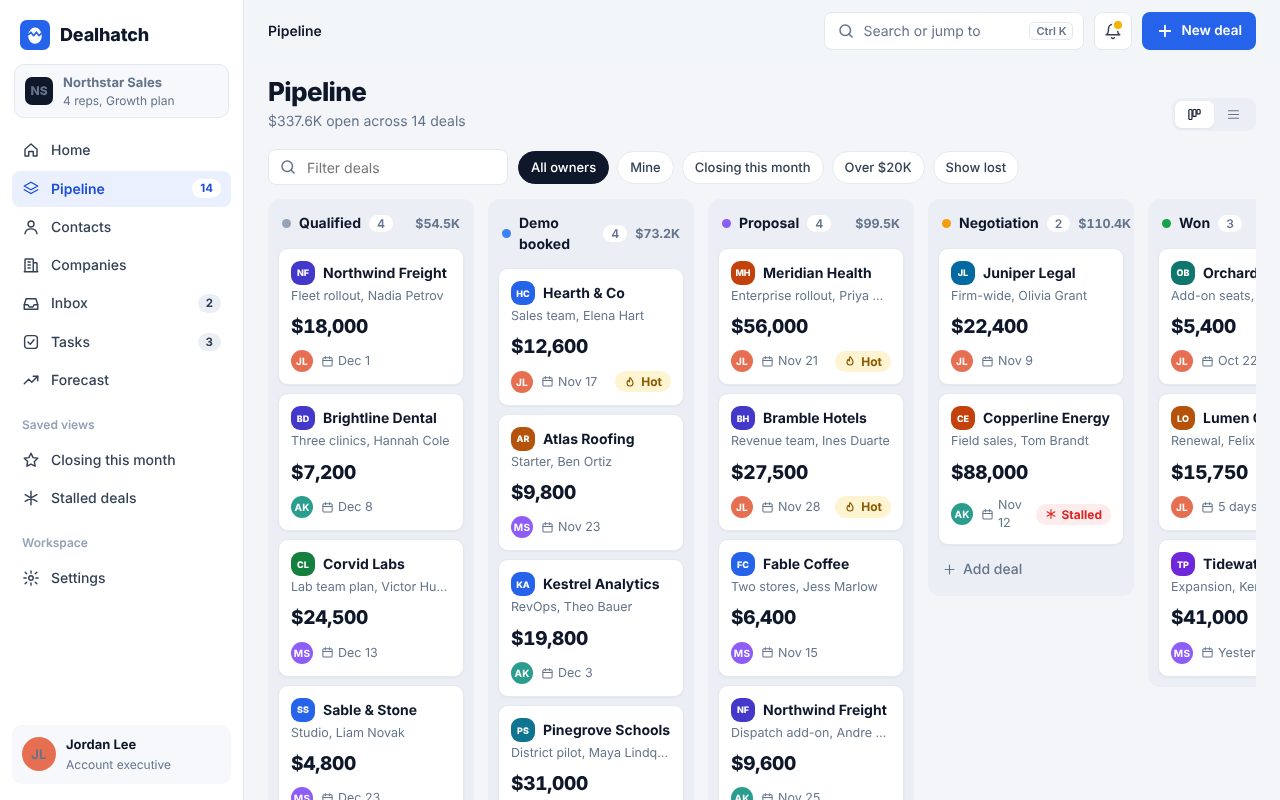
Above: an interactive demo of Dealhatch, a sample CRM, and a motion demo video made for Stacked Growth. Both were made with Igniva. More on the sample demos page.
Embed it anywhere
- Your site: paste one line of embed code on your homepage or product pages
- Sales emails: add the demo to outbound and follow up
- A link you share: send it before or after a call
- Ads and socials: download the video as an MP4 for ads, socials and slides
For every demo, Igniva shows how many people viewed it, how many finished and how many clicked through.
How Igniva compares
| Igniva | Storylane Starter | Navattic Base | Arcade Growth | Supademo Scale | |
|---|---|---|---|---|---|
| Monthly price | $44.99 a month, billed annually | $50 per seat | $600 for 5 seats | $50 per seat | $50 per creator |
| Built from your sales calls | Yes | No | No | No | No |
| Motion graphics demo video | Yes | Screen video | AI avatar narration | Screen video | Screen video |
| Full video editor | Yes | No | No | Trim, split, zoom | Trim, split, speed |
| 20+ pro motion templates | Yes | Brand themes | Custom themes | Not listed | Not listed |
| Interactive demo for your site | Yes | Yes | Yes | Yes | Yes |
| HTML capture of your app | Yes | Needs $500/mo plan | Yes | Enterprise only | Needs $450/mo plan |
| MP4 download | Yes | Yes | No | Yes | Yes |
Cheapest published paid plan for each company, billed monthly, as listed in September 2026. Navattic also offers a Startup plan priced on request. Free plans with limits are also available. Features as described by each company and its help docs. See every comparison in full.
One plan. Everything included.
The Founding 100
The first 100 SaaS teams get founding perks. When the spots are gone, they are gone. The offer ends in February 2027, and 40 of 100 spots are left.
Your price, locked in for life
Whatever Igniva costs later, your plan stays at the price you joined on.
A 15 minute review with our founder
Our founder walks through your first demo with you.
Frequently asked questions
What is Igniva?
Igniva is a self-serve web app for SaaS teams. It turns your product and your sales calls into a 60 or 90 second motion demo video and an interactive demo that buyers can click through.
Do I need to be technical?
No. If you can paste a link, click through your own app and upload a call, you can make a demo.
Do I need to install anything?
Only the Igniva Chrome extension, to click through your app once. It only records the tab you start it in, and only while you are capturing.
What if I don't have recorded sales calls?
Videos are built from your calls, so you need at least one. Link it from Zoom, Gong or Fathom, or upload a recording. Interactive demos only need your app screens.
How long does it take?
Minutes. Hit Generate and your video or interactive demo is ready in minutes. Most of your time goes into the quick edits you choose to make.
What if I don't like my demo?
Change it. Editing the words and scene lengths takes seconds, and you can redo any scene in one click.
Do the videos have a voiceover?
No. Igniva videos use motion, your animated product screens and on-screen text, so they work with the sound off.
Does Igniva capture leads or connect to my CRM?
No. Igniva counts views, finishes and clicks for each demo. It does not collect contact details or sync to a CRM.
What does the plan include?
Everything: motion demo videos, interactive demos, the full video editor, all 20+ pro motion templates, HTML capture, embed, share link and MP4 download, plus view, finish and click counts. One plan, no tiers.
Can I cancel anytime?
Yes. The monthly plan is $49.99 a month and you can cancel anytime. The annual plan is $44.99 a month, billed at $539.88 a year.
A motion demo video and an interactive demo, built from your sales calls. From $44.99 a month, billed annually.